VERSION 1.11.1 · ON-DEVICE LEARNING · THERMAL GUARD · EN / PT

More control.
Battery life that adapts to you.

Adaptive Brain 2.0 learns device usage patterns, predicts heat and memory pressure, and puts safety first. Predictions can only skip optional preloading; they never freeze apps. Automatic mode retains reversible two-minute tests, follow-up evidence and native Android thermal protection. Portuguese and English included.

Open-source project · Android 8 or later · advanced features require Shizuku
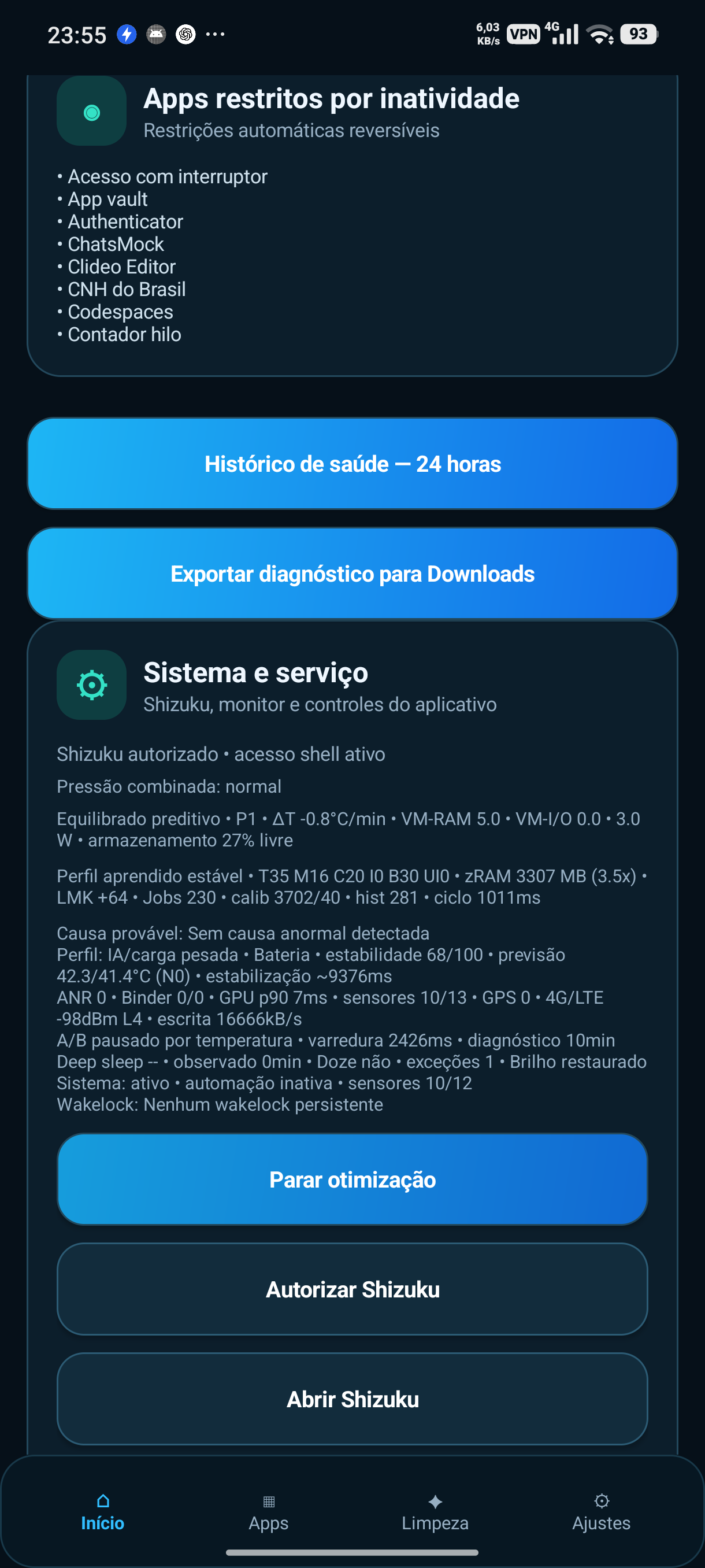
Adaptive Performance home screen
◎Daily targetAdaptive savings
↗Smart idleFewer background checks

Version 1.11.1: stability and review

This update preserves Adaptive Brain 2.0 and fixes local learning-history persistence, makes CodeRabbit comment retrieval more accurate and stabilizes Android Lint in GitHub Actions. No additional always-on monitoring services.

Download 1.11.1 update

Adaptive Brain 2.0 — 10 intelligent upgrades

Private on-device learning with safe decisions: no AI cloud required and no risky settings triggered by model predictions. Availability varies by Android, ROM, sensors and Shizuku.

1
Contextual ML 2.0

Two tiny on-device Java models learn screen, CPU/RAM, battery, thermal and time patterns. Prediction-based decisions require at least 48 samples.

2
Next-app prediction

Learns common app transitions and only prioritizes a predicted app within an already safe recent-app shortlist. Does not launch apps.

3
Thermal AI Pro

Combines real hardware temperatures and Android thermal APIs with an illustrative five-minute trend. No synthetic status injection in automatic mode.

4
Charging observation

Displays battery temperature and reported charging current where available. Cannot change charger output power.

5
Predictive RAM

Projects available RAM over 10 minutes and avoids optional preloading under memory pressure.

6
Frame smoothness

Briefly samples the Adaptive Performance interface, without continuously profiling other apps.

7
Self-overhead governor

Tracks its own CPU cost and reduces optional activity when needed.

8
Contextual auto recovery

Following a strong regression after preload, can suspend optional caching for six hours without changing user preferences.

9
Routine profiles

Recognizes games, navigation, messages, social use and idle states to avoid unnecessary work.

10
Results laboratory

Shows predictions, trials, reversions and diagnostics. Observational results do not prove battery savings.

ML starts in observation-only mode and needs at least 48 training samples. Sensors and advanced controls vary by device; battery gains are not guaranteed.

Automatic for simplicity. Advanced for full control.

The app combines usage learning, thermal protection, memory management, and battery savings in an accessible interface while keeping technical controls available for manual tuning.

A
Automatic testing and learning

Records a 2-minute baseline and tests each reversible setting for 2 minutes. Only verified improvements are kept; regressions are rolled back.

%
Battery target

Choose a minimum battery percentage and a target time. The app estimates an hourly power budget and adapts its savings.

°
Thermal protection

Tracks temperature trends and applies gradual thermal protection to limit overheating.

R
RAM and zRAM

Memory compression, thrashing protection, adaptive limits, and abnormal memory growth detection.

Z
Smart idle

Deep sleep, Doze, wakeups, and background tasks are coordinated according to usage conditions.

↗
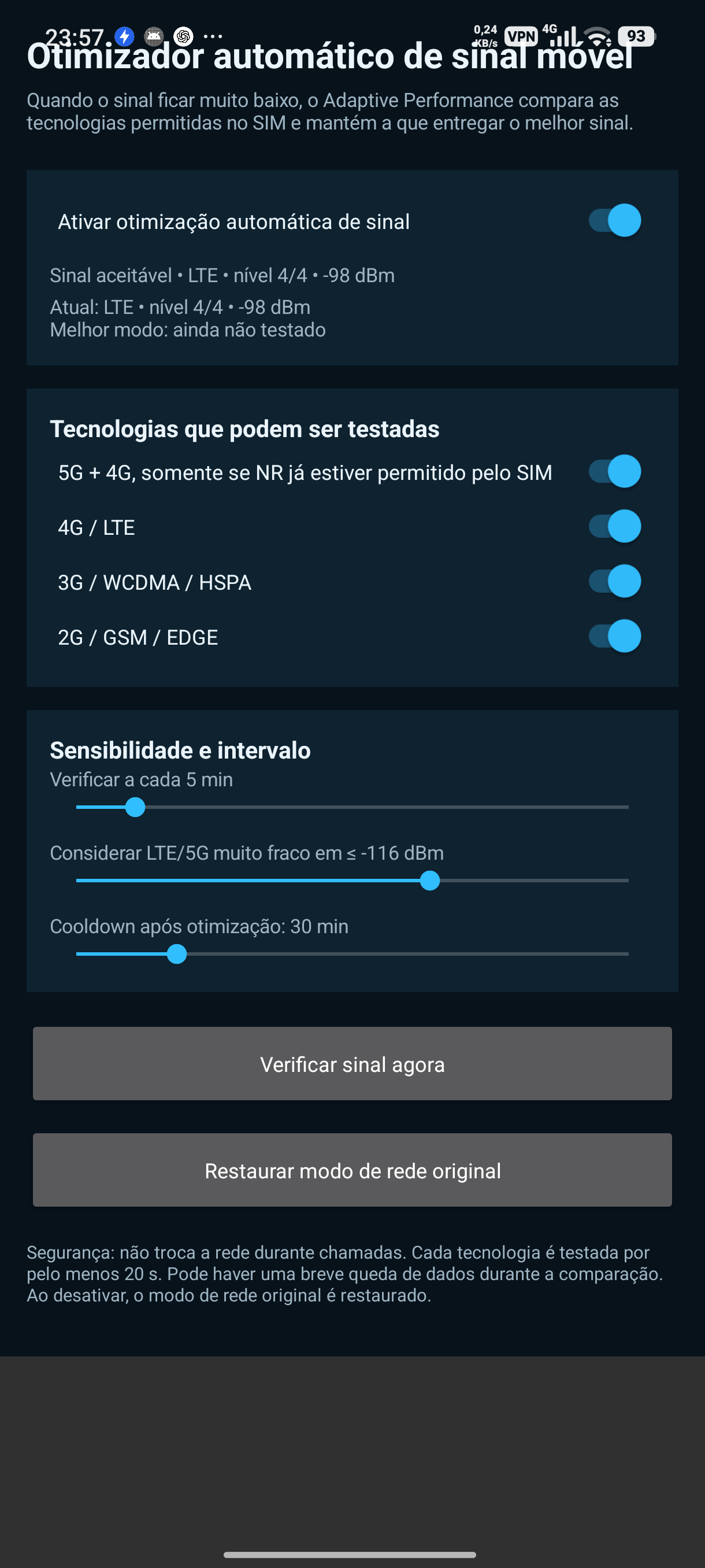
Adaptive mobile signal

When signal is weak, compares SIM-supported 5G, 4G, 3G, and 2G modes without switching networks during calls.

⌖
Optional GPS savings

Limits background location updates with the screen off and restores settings when you resume use or connect the charger.

⏱
Power use and battery life

Tracks recent battery drain and estimates remaining runtime. Estimates are approximate and improve with use.

◎
Recent app preloading

Every 15 minutes, identifies up to four recently used apps, preloads selected APK resources, and displays the current list.

50
Savings below 50%

Reduces preload, diagnostics, and maintenance budgets when the battery is low or the SoC and battery become hot.

SSD
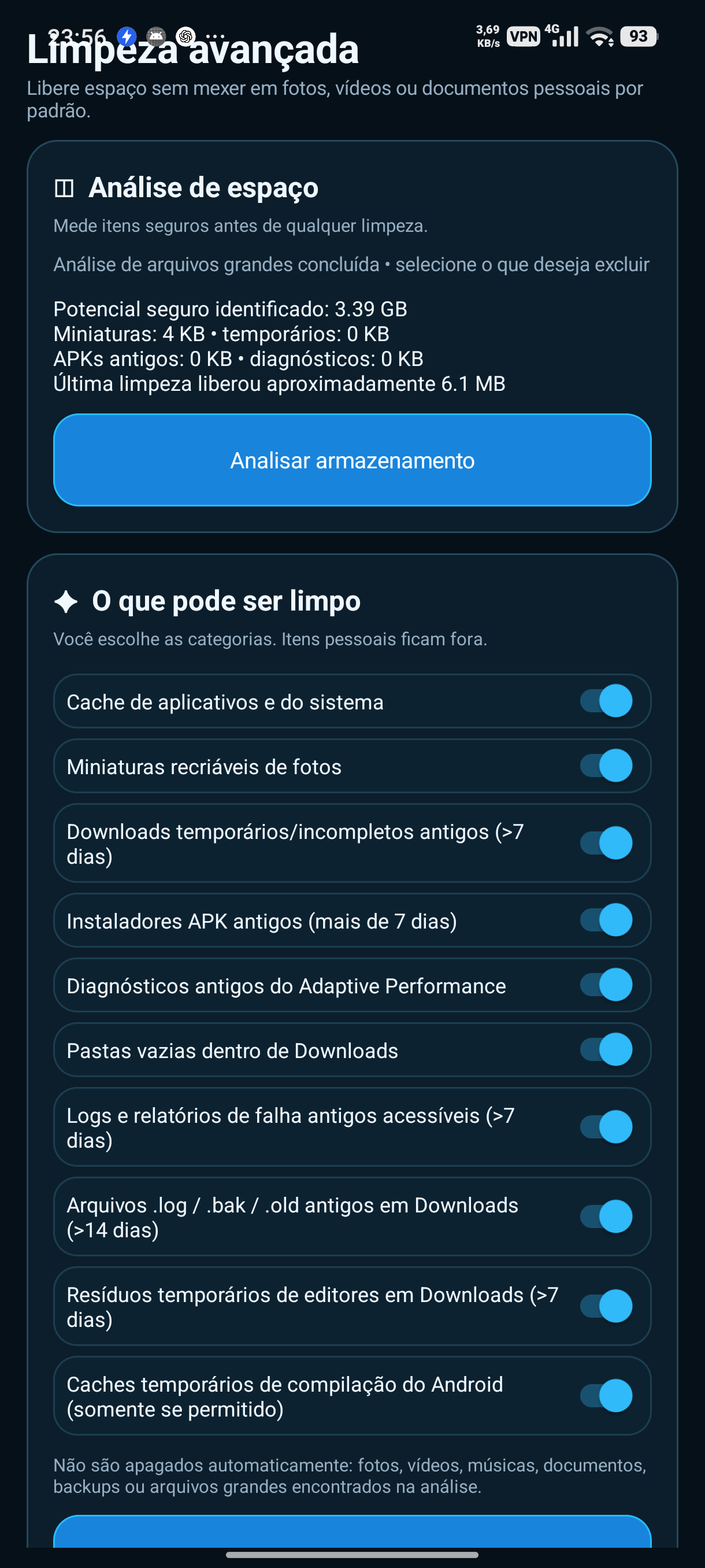
Storage health

Checks F2FS, GC, discard, and free-space changes hourly and requests maintenance only when needed while the device is idle.

+
Advanced mode

Manual control over thermal behavior, CPU, memory, cleanup, freezing, diagnostics, and other modules.
Power savings adapt to your needs.

With a battery target, the app tracks estimated usage. In Automatic mode, controlled tests compare power draw, CPU, RAM, temperature and responsiveness. Risky or irreversible operations are not included in automatic trials.

Balanced savingsAdaptive savingsMaximum savings
Target20% by 10:00 PM
Current battery62%
Budget~4.2% per hour
ActionAdaptive savings

See the tools in action.

Actual project screenshots. Features and appearance may vary with Android version, manufacturer and permissions.

Main dashboardStorage cleanupMobile signal optimizer

Faster response to weak signal. More GPS control.

10s
Faster network comparison

The optimizer confirms a weak signal in 10 seconds and tests each radio technology for 10 seconds. Default checks are every minute, with at least 5 minutes between optimization attempts.

⌖
Background GPS

Enable this in the signal optimizer. With the display off, the interval extends to 15 minutes; turning the screen on or charging restores the previous setting. Geofences and tracking may update later.

SIM
Works within device and carrier limits

Adaptive Performance only tests network modes allowed by the SIM profile. Availability of 2G, 3G, 4G and 5G depends on the device, ROM and carrier.

Installation simples. Features extras quando precisar.

Download the APK

Use the latest version published under Releases in this repository.

Install on Android

Allow the browser or file manager to install the APK when Android prompts you.

Connect Shizuku

Some features work without Shizuku, but advanced controls need shell privileges.

See what consumes your battery.

Explore Automatic and Advanced modes and tailor the strategy to your device and routine.

Download Adaptive Performance